
Debugging is one of the most important skills every programmer must learn. No matter how experienced a developer becomes, errors will always appear while writing code. Understanding how to debug code step by step helps programmers identify problems quickly and fix them efficiently.
Many beginners feel frustrated when their programs do not work as expected. However, debugging is not just about fixing mistakes. It is also about understanding how the program behaves and improving its performance. Learning how to debug code step by step allows developers to analyze problems carefully instead of guessing solutions.
By following a structured debugging process, programmers can save time and avoid unnecessary confusion.
What Is Debugging
Debugging is the process of identifying, analyzing, and fixing errors in a program. These errors may occur because of incorrect instructions, missing information, or unexpected conditions.
When developers learn how to debug code step by step, they gain the ability to trace problems back to their source and correct them effectively.
Debugging is not only about removing errors but also about improving the overall reliability of a program.
Why Debugging Is Important
Debugging plays a crucial role in software development. Without debugging, programs may produce incorrect results or fail completely.
Learning how to debug code step by step helps programmers:
Understand how their programs behave
Identify hidden errors quickly
Improve the quality of their code
Develop better problem-solving skills
Debugging also helps developers learn from their mistakes and write stronger programs in the future.
Common Types of Coding Errors
Before learning debugging methods, it is useful to understand the types of errors that often occur in programs.
Syntax Errors
These errors happen when the code does not follow the rules of the programming language. Even a small mistake in spelling or structure can cause the program to fail.
Logical Errors
Logical errors occur when the program runs but produces incorrect results because the instructions are not logically correct.
Runtime Errors
Runtime errors happen while the program is running. These errors occur when the program encounters unexpected situations.
Understanding these problems is the first step in learning how to debug code step by step.
You may also like to read these posts:
Learn Programming Basics From Scratch Easily
Simple Python Tutorial for Beginners Guide
Beginner Friendly JavaScript Guide for New Coders
Coding Fundamentals Explained Simply for Beginners
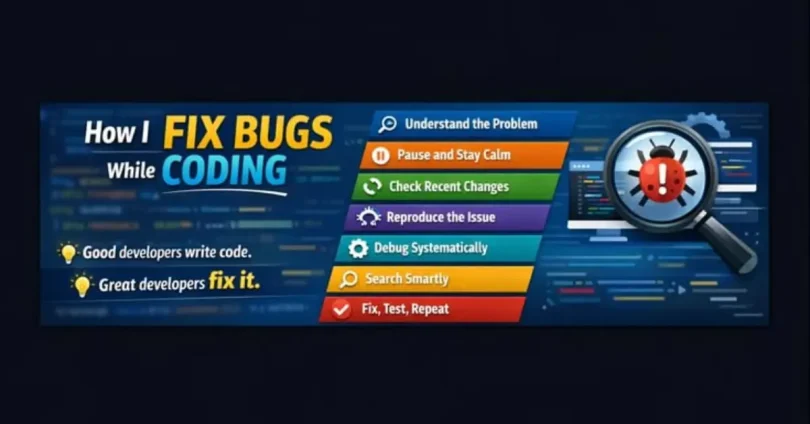
Step 1: Carefully Read the Error Message

Most programming environments provide error messages when something goes wrong. These messages often explain what caused the problem and where it occurred.
When learning how to debug code step by step, beginners should start by reading the error message carefully instead of ignoring it.
The message usually points to the line or section of the program where the issue occurred.
Step 2: Reproduce the Problem
The next step is to repeat the situation where the error occurred. Reproducing the problem helps programmers confirm that the issue still exists and understand what triggers it.
Following this approach is an important part of how to debug code step by step because it allows developers to observe the problem more clearly.
Step 3: Check Recent Changes
If a program was working before but suddenly stopped working, the issue may be related to recent changes in the code.
Programmers should review the latest modifications and verify whether something was written incorrectly. This technique is commonly used when learning how to debug code step by step.
Often, small changes in the code can accidentally create new errors.
Step 4: Break the Problem into Smaller Parts
Large programs can make debugging difficult. One effective strategy is dividing the problem into smaller sections.
By checking each section individually, programmers can identify exactly where the issue occurs. This method is a core principle of how to debug code step by step.
Breaking down the program makes the debugging process much easier and more manageable.
Step 5: Use Testing and Observation
Testing different inputs can help reveal where the program behaves incorrectly. Observing how the program responds to different situations can highlight logical mistakes.
When developers learn how to debug code step by step, they often test their programs repeatedly to confirm whether the problem has been fixed.
Careful observation is one of the most valuable debugging skills.
Step 6: Review the Program Logic
If the program runs but produces incorrect results, the issue may be related to logical errors.
Developers should analyze whether the instructions truly solve the intended problem. Studying program logic is a key step in understanding how to debug code step by step.
Sometimes a program follows instructions correctly, but the instructions themselves are wrong.
Step 7: Ask for Help or Research Solutions
When programmers cannot solve a problem on their own, they often search for solutions online or ask other developers for help.
Programming communities and forums are useful resources for learning how to debug code step by step because many developers share solutions to common problems.
Reading discussions and explanations can provide new perspectives on solving errors.
Tips for Effective Debugging
Debugging becomes easier with practice and the right mindset. Here are some helpful tips for beginners.
Stay calm and patient while solving problems.
Read code carefully instead of rushing through it.
Use clear and organized programming structure.
Test programs frequently during development.
Keep learning from previous mistakes.
These habits make it easier to apply how to debug code step by step in real programming situations.
Benefits of Strong Debugging Skills
Developers who master debugging become more confident and efficient programmers.
They can identify problems faster and build more reliable applications. Learning how to debug code step by step also improves logical thinking and analytical skills.
These abilities are valuable not only in programming but also in many other technical fields.
Frequently Asked Questions
What does debugging mean in programming?
Debugging is the process of identifying and fixing errors in a computer program.
Why is debugging important for programmers?
Debugging helps programmers detect mistakes and improve the quality and reliability of their programs.
Can beginners learn debugging easily?
Yes, beginners can learn debugging by practicing problem-solving and understanding how programs behave.
What causes most coding errors?
Most coding errors occur due to syntax mistakes, incorrect logic, or unexpected runtime conditions.
How can I improve my debugging skills?
You can improve debugging skills by practicing regularly, analyzing errors carefully, and learning from previous programming mistakes.
Conclusion
Debugging is an essential skill for anyone learning programming. Errors are a normal part of coding, and learning how to solve them effectively is a key step toward becoming a skilled developer.
This guide explained how to debug code step by step by discussing error messages, reproducing problems, reviewing changes, testing solutions, and analyzing program logic.
By practicing these techniques regularly, beginners can improve their coding skills and become more confident when working with complex programs.